Case study
Rethinking NDIS Workforce Software
A support worker’s research into rostering, SCHADS Award compliance and claims, and what a better app could look like
Arash Heidarzadeh Naeini · September 2026
Summary
NDIS providers rely on workforce apps such as Deputy and ShiftCare to roster support workers, record shifts, pay staff and bill participants’ plans. Working as a support worker, and after talking with managers at two providers and several of my co-workers, I kept hearing the same frustration: these apps are complicated, and the hardest parts of the job (applying the SCHADS Award, choosing the right NDIS line items, checking travel claims) are still largely done by people rather than by the software.
This case study compares the main apps on the market, explains the two sets of rules every NDIS provider has to follow at the same time, and identifies where current software falls short. It finishes with design principles and concept screens for a worker‑friendly, participant‑aware alternative.
1. How I became curious about NDIS workforce apps
Throughout my Bachelor of Software Engineering I was always looking for real problems worth solving, but for a long time I hadn’t found one I wanted to dig into properly. That changed while I was working one of my casual jobs as an NDIS support worker.
One participant I regularly supported was sharp and very interested in technology. Over coffee one day I asked him: if you could build a new app, or improve an existing one, what would it be? Without hesitating, he said: “NDIS workforce management apps.” His family runs an NDIS provider, and he explained that his mum constantly struggled with how complicated these systems were to use day to day. For her, running the business side of care felt like a nightmare.
I realised I was sitting between both sides of the same problem: I used these apps every week as a worker, and here was someone describing the pain from the office side. That conversation is where this research started.
2. Researching the existing apps
At first I didn’t know where to begin, so I started with what I had: the app on my own phone. My employer at the time used Deputy, so I could only see the support worker’s view. The design wasn’t especially attractive, but it was efficient for clocking in and checking shifts. When I looked at Deputy’s website, I noticed it serves many different industries, and NDIS didn’t appear to be its main focus at all.
To understand the office side, I approached my manager and explained what I was researching. He was very welcoming and spent a good amount of time walking me through the problems he saw. I then set up a Zoom interview with a manager from another provider where I had completed a work placement; her team used ShiftCare. I also spoke with a number of support workers about their day‑to‑day experience.
Hearing from both office staff and workers gave me a much fuller picture. Some opinions conflicted with each other, and some problems came up that nobody seemed to be thinking about. Those are covered in Section 4.
2.1 Research methods
- Hands‑on use: my own use of Deputy as a support worker.
- Interviews: managers from two NDIS providers (one using Deputy, one using ShiftCare) and several support workers.
- Desk research: vendor websites, help‑centre documentation, app store listings and independent reviews for each platform.
- Regulatory review: the SCHADS Award and Fair Work Ombudsman pay guidance, and the NDIS Pricing Schedule 2026–27, to understand the rules the software is supposed to implement.
2.2 The apps at a glance
The market splits into two broad groups: general workforce tools that can be configured for disability work, and platforms built specifically for NDIS providers.
| App | Type and typical user | Strengths | Weaknesses |
|---|---|---|---|
| Deputy | General workforce platform used across hospitality, retail, healthcare and more [11] | Reliable rostering, timesheets and award interpretation; strong worker mobile app; SCHADS supported through configurable templates [11][12] | Not built for NDIS: does not generate NDIS claims, so providers need a separate billing system and double entry [11]; no participant records or care context [13] |
| ShiftCare | NDIS and aged‑care specific; popular with small to mid‑sized providers | NDIS price guide built in, bulk claiming, participant budgets, GPS clock‑in and mileage tracking; Xero, MYOB and QuickBooks integrations [15][16] | Reviewers report Xero sync dropping data, cost rising for small–medium providers, no dedicated admin mobile app and clunky recurring‑shift setup [14] |
| Lumary | Enterprise platform built on Salesforce; large providers | Very deep configuration and reporting for complex, multi‑site organisations [17] | Independent rating of 2.5/5 on ProductReview, with complaints of a clunky interface and expensive implementation [17] |
| Brevity, SupportAbility, CareMaster | NDIS practice‑management tools for small to mid providers | All‑in‑one intake, notes, rostering and claiming; CareMaster publishes flat per‑user pricing [17] | Feature depth and usability vary; reliability issues reported after NDIA system changes [18] |
3. Background: two rulebooks running at once
To understand why these apps feel complicated, it helps to understand what they are trying to automate. Every NDIS provider has to follow two separate sets of rules at the same time, set by two different government bodies:
- The SCHADS Award (Fair Work Commission) sets the minimum a provider must pay its workers: pay levels, penalty rates, allowances and rostering rules.
- The NDIS Pricing Schedule (NDIA) sets the maximum a provider can charge a participant’s plan, including which line item to use and how travel can be billed.
A single shift therefore has two different “prices” attached to it: what the worker is owed and what the participant can be charged. The software has to calculate both correctly, and keep them in line with each other.
3.1 Why the SCHADS Award is hard to automate
The SCHADS Award combines four streams and eight levels with multiple pay points, plus weekend and public holiday penalties, shift loadings, sleepovers, broken shifts, 24‑hour care, travel between clients and on‑call arrangements, often all for the same worker within one fortnight [6]. Some of the rules that matter most for software:
| Rule (from 1 July 2026) | What it means for a rostering app |
|---|---|
| Minimum engagement: generally 2 hours for casual and part‑time staff [6] | A 1‑hour visit must still be paid as 2 hours. The app should warn the rosterer before publishing, not after payroll. |
| Broken shift allowance: about $21.81 (one unpaid break) or $28.87 (two) [6] | A shift can turn into a broken shift on the day, and the obligations follow the shift as it was actually worked, not as planned [8]. |
| Travel between clients during a shift is paid work time and does not break the shift [1] | The app must tell the difference between genuine travel and a gap that is really a break. A 90‑minute roster gap labelled “travel” when the drive takes 15 minutes is a common mistake that can trigger broken‑shift and minimum‑engagement costs [7]. |
| Vehicle allowance: $1.01/km from July 2026, temporarily raised to $1.05/km from 1 September 2026 until 28 February 2027 [2] | Rates are time‑bound. The app needs to apply the right rate to the right pay period and revert automatically. |
| Sleepover allowance: about $62.87 per sleepover [6] | Overnight shifts need their own shift type, with rules for being woken to work. |
3.2 The rules keep changing
One of the strongest findings of my research is how often these rules change, even within a single year. In 2026 alone:
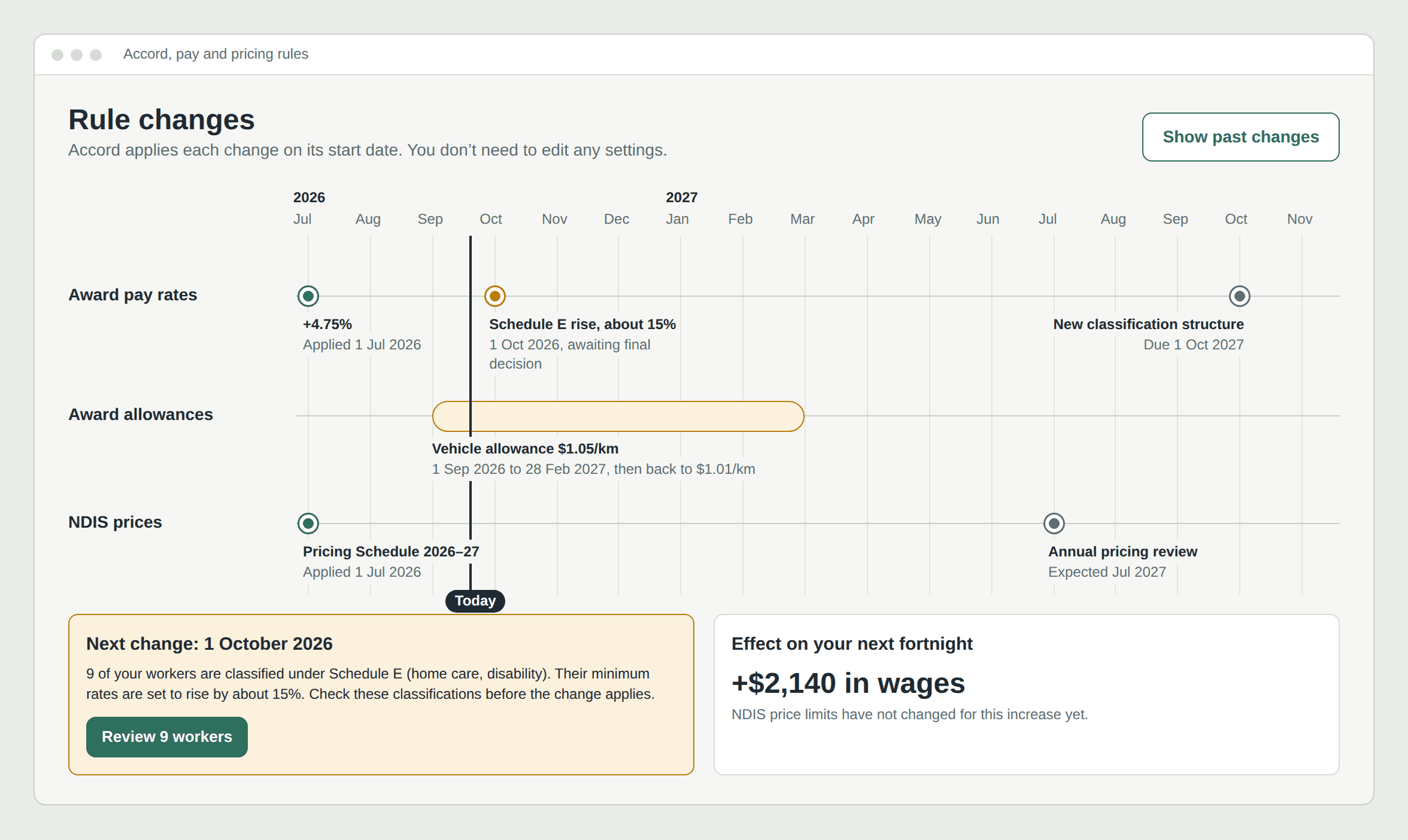
- 1 July 2026: all SCHADS rates rose 4.75% through the Annual Wage Review [6].
- 1 September 2026: the vehicle allowance temporarily rose from $1.01 to $1.05 per km because of fuel prices, ending on 28 February 2027 [2].
- 1 October 2026: following the Fair Work Commission’s gender‑undervaluation review, workers under Schedule E (home care, disability) are set to receive an interim increase of around 15% [5]. The Commission’s view on this increase was provisional pending final submissions [3].
- 1 October 2027: a new integrated classification structure is due to replace the current structure for most other SCHADS employees [4].
The Commission itself found the current classification structure complex, inconsistent across streams and prone to misclassification [4]. If the experts regard the rules as hard to apply, it is unrealistic to expect a small provider’s office manager to configure them correctly by hand.
3.3 Where the two rulebooks don’t line up
The award and the NDIS pricing rules are updated separately, so they can drift apart. Two examples from 2026:
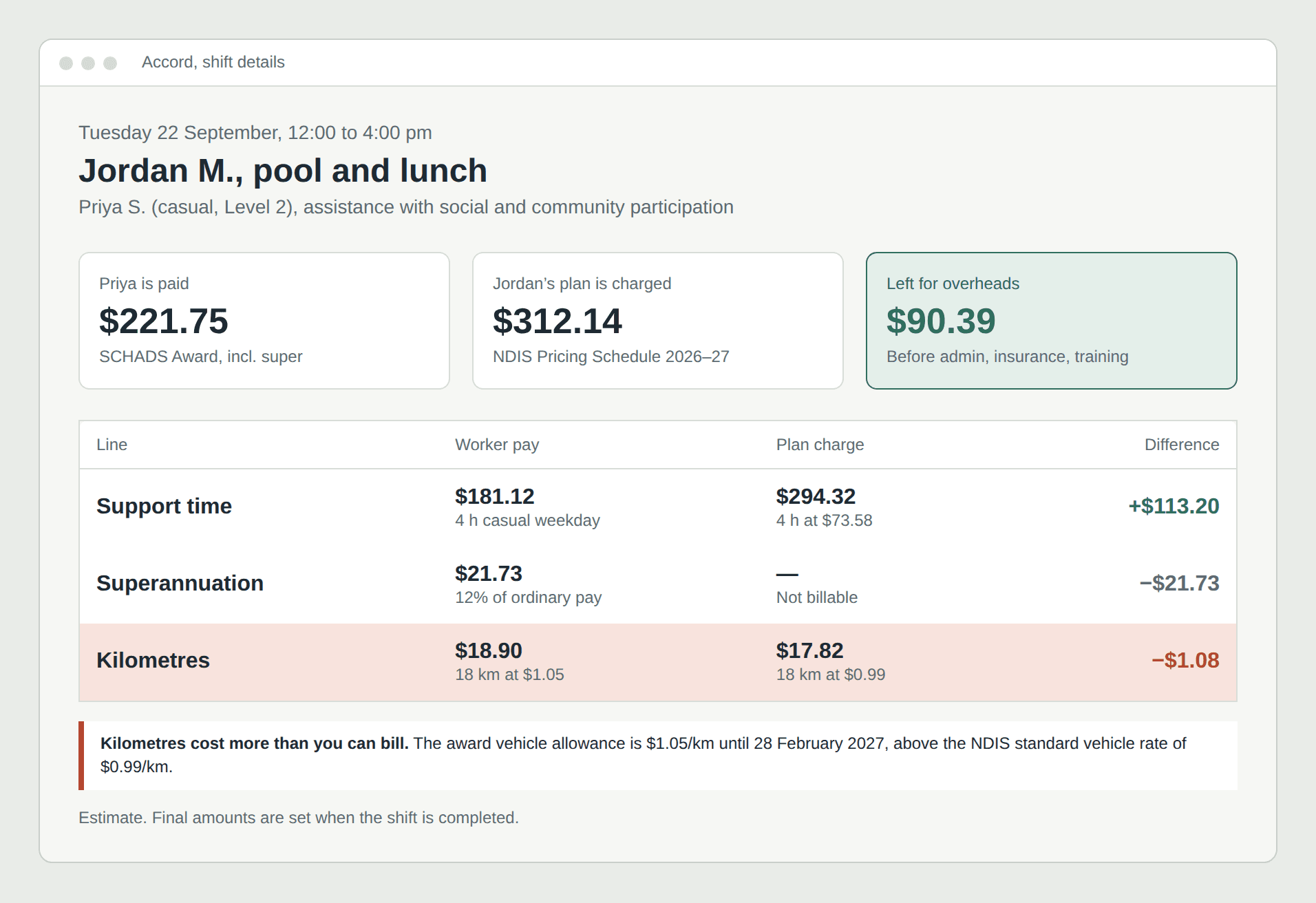
- Kilometres: from September 2026 a provider must pay a worker $1.05/km under the award [2], while the standard NDIS rate a provider can bill for a non‑modified vehicle is $0.99/km [9]. Every kilometre driven costs the provider more than it can recover.
- Wages vs price limits: the NDIA’s 2026–27 pricing review adjusted price limits for the 4.75% July increase, but at the time of writing there was no confirmed NDIS pricing change to absorb the Schedule E increase [19].
Current apps treat payroll and billing as separate modules, often in separate products. None of the tools I reviewed clearly shows a provider the margin on each shift in plain terms, i.e. what they will pay versus what they can bill, at the moment they create the roster. (ShiftCare offers shift costing on its top tier, using data from a connected payroll system [16].)
4. Main problems identified
Below are the problems that came up most often in my interviews and my own experience, each expanded with what my desk research found.
4.1 The processes are too complicated
What I heard
Both managers described spending large amounts of time on admin that should be simple: setting up shifts, fixing timesheets, and checking that the right items are billed. Workers found parts of the apps confusing, especially anything beyond clocking in and out.
What the research shows
Much of this complexity is inherited from the rules in Section 3 rather than created by the apps. The problem is that the apps pass that complexity straight to the user. Reviewers of ShiftCare, for example, describe an awkward date picker, shifts limited to 15‑ or 30‑minute increments and excessive clicking when setting up recurring shifts [14]. Deputy avoids some of this by being simpler, but only because it leaves NDIS billing to another system [11].
Why it matters
Every extra step is a chance for a mistake that either underpays a worker or overcharges a participant’s plan.
4.2 Weak integration with the SCHADS Award
What I heard
Managers didn’t fully trust the award calculations and often double‑checked pay manually.
What the research shows
Both Deputy and ShiftCare apply SCHADS rules through templates or settings that the provider configures. They apply the rules as set up, rather than independently checking that the resulting pay matches the award [12]. The clauses that most often slip through are broken‑shift allowances and minimum periods, sleepover and overtime rules, and overtime thresholds crossed across several shifts [12]. With four major rate changes in a single year (Section 3.2), templates can easily fall out of date.
Why it matters
Underpayment errors are rarely one big mistake. They are usually a small error repeated on every shift, every fortnight, for years [6].
4.3 No simple, reliable payroll integration (Xero and similar)
What I heard
Exporting timesheets into payroll was described as fiddly, and something that still needed manual checking.
What the research shows
ShiftCare advertises one‑click export of approved timesheets and invoices to Xero [16], but reviewers report that the integration sometimes drops records, so they still download and re‑upload files to be sure [14]. Deputy integrates well with payroll but not with NDIS billing, so providers end up with a third system and double entry [11].
Why it matters
An integration that is right “most of the time” forces staff to check everything, which removes most of the time it was meant to save.
4.4 Defining shift types, rates and billing line items
What I heard
Setting up a new type of shift, such as a weekend community outing or a sleepover, means configuring both the pay rules and the correct NDIS line item and price, and staff found it hard to know they had got it right.
What the research shows
Travel is a good example of how granular this gets. Provider travel time is billed under the same line item as the support but on a separate line, while kilometres are billed on a separate “provider travel – non‑labour costs” item, and travel time is capped at 30 minutes in metropolitan areas and 60 minutes in regional areas [9]. Transporting a participant during a shift is billed differently again, as activity‑based transport [9]. ShiftCare has built “split mileage” features to separate these [16], which shows how much complexity sits behind a single car trip.
Why it matters
If a shift type is set up wrongly once, every shift built from it is wrong.
4.5 No smart scheduling for mixed shifts and rates
What I heard
A single worker’s day can include a weekday morning visit, an afternoon community outing and an evening shift. Each attracts different pay rates and different billing items, and rosterers have to work out the combination themselves.
What the research shows
Newer tools advertise matching workers to participants based on skills and availability [15], but matching is not the same as cost‑aware scheduling. The most common rostering error in this sector, treating a gap between clients as travel when it is really a break [7], is exactly the kind of thing software could catch while the roster is being built.
Why it matters
A smarter scheduler could suggest a different order of visits or a different worker that avoids an unnecessary broken shift, saving money for the provider without reducing the worker’s pay.
4.6 No proper tracking of kilometre claims
What I heard and experienced
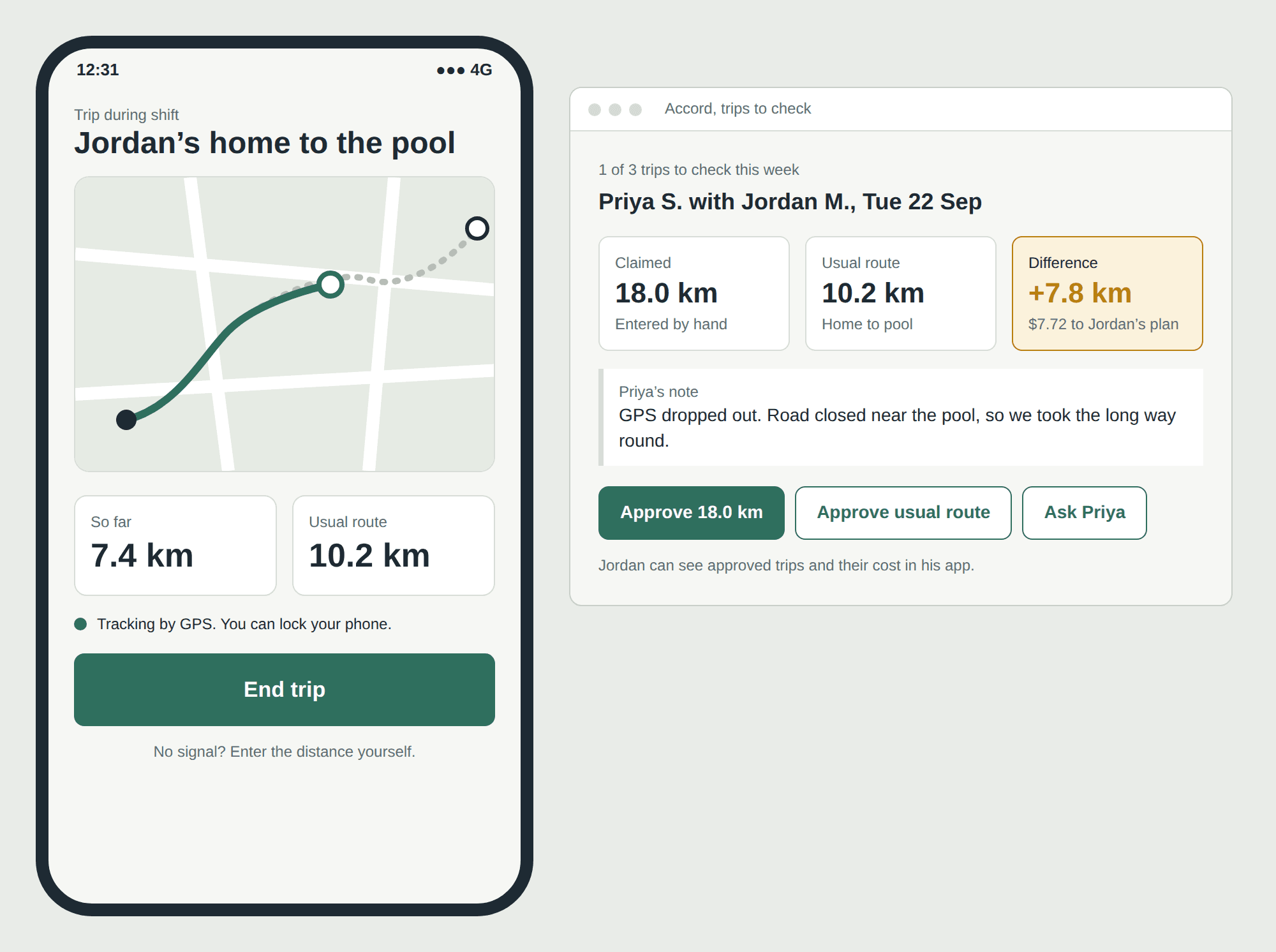
Through my own work and my interviews, I found that there is often no reliable way to check the kilometres a support worker claims when taking a participant out. For example, a participant’s home might be 10 km from a café, but 15 or 20 km is claimed, with an explanation such as “I took a wrong turn”, or no explanation at all, and the claim is still approved. Most participants have a limited transport budget, so over time these extra kilometres can quietly drain their funding. Meanwhile, the coordinators who review claims may be responsible for dozens or even hundreds of participants, so checking every trip by hand isn’t realistic.
What the research shows
This problem is partly solved in some apps, but not consistently. ShiftCare now offers GPS mileage tracking for both travel to a shift and trips during a shift, plus mileage variance monitoring [16]. However, it has to be turned on by an admin, and workers can still use manual entry, optionally with odometer photos [16]. In other words, accurate tracking exists but is optional, and apps like Deputy that aren’t built for NDIS don’t focus on it. The participant, whose plan actually pays for the kilometres, typically has no simple way to see or confirm what was claimed.
Why it matters
Over‑claiming isn’t always deliberate. Workers forget readings, round up, or take a detour for good reasons. A good system should make the accurate figure the easiest one to submit, and flag big differences for a quick human check, rather than treating every worker as a suspect.
4.7 Participants are not designed for
What I heard
These apps are designed for two users, the office and the worker. The participant, the person the whole system exists to serve and whose plan pays for everything, is largely left out.
What the research shows
Some platforms offer optional family or client portals [20], but they are typically add‑ons designed around the provider’s view. The NDIA itself has said participants were finding that travel costs drained their funding faster than expected [10], which suggests participants need clearer visibility of what is being charged.
Why it matters
A participant who can see their upcoming supports, who is coming, and what each shift is costing their plan in plain language is better able to make choices and to spot mistakes early. Any participant‑facing view must also be accessible, e.g. large text, screen‑reader support and Easy Read language.
4.8 Pricing
What I heard
Small providers felt the software was expensive for what they used, especially when they needed more than one product.
What the research shows
Pricing models vary widely: per‑user subscriptions (CareMaster publishes around A$16–$36 per user per month), and custom quotes for enterprise platforms such as Lumary [17]. A small provider on Deputy still needs a separate billing tool and payroll path, so the real cost is the total of all the systems plus the staff time spent moving data between them [11]. ShiftCare reviewers have also commented that the platform became expensive for small to medium businesses [14].
Why it matters
Small providers are the ones least able to absorb both high software costs and the cost of payroll mistakes.
5. Key insights
Looking across all the apps, interviews and regulations, five insights stood out:
- Two rulebooks, no bridge. Pay (SCHADS) and billing (NDIS) are handled as separate modules or separate products, even though every shift needs both. The gap between them, such as $1.05/km paid versus $0.99/km billed, is invisible until the provider’s accounts show it.
- Rules are treated as settings, when they should be versioned data. Rates changed at least four times across 2026–27. Software should store rules with start and end dates and apply them automatically, instead of relying on someone to update a template on the right day.
- Compliance is checked too late. Most errors are created when the roster is built (a gap that becomes a broken shift, a visit under the minimum engagement), but they are discovered at payroll or audit. Warnings belong at the point of rostering.
- The person who pays is invisible. The participant funds every shift and every kilometre but usually has the least visibility of any user.
- Trust should come from evidence, not suspicion. Accurate records, like GPS‑tracked trips, protect honest workers as much as they protect participants, as long as the default path is automatic and easy.
6. Proposed solutions and design concepts
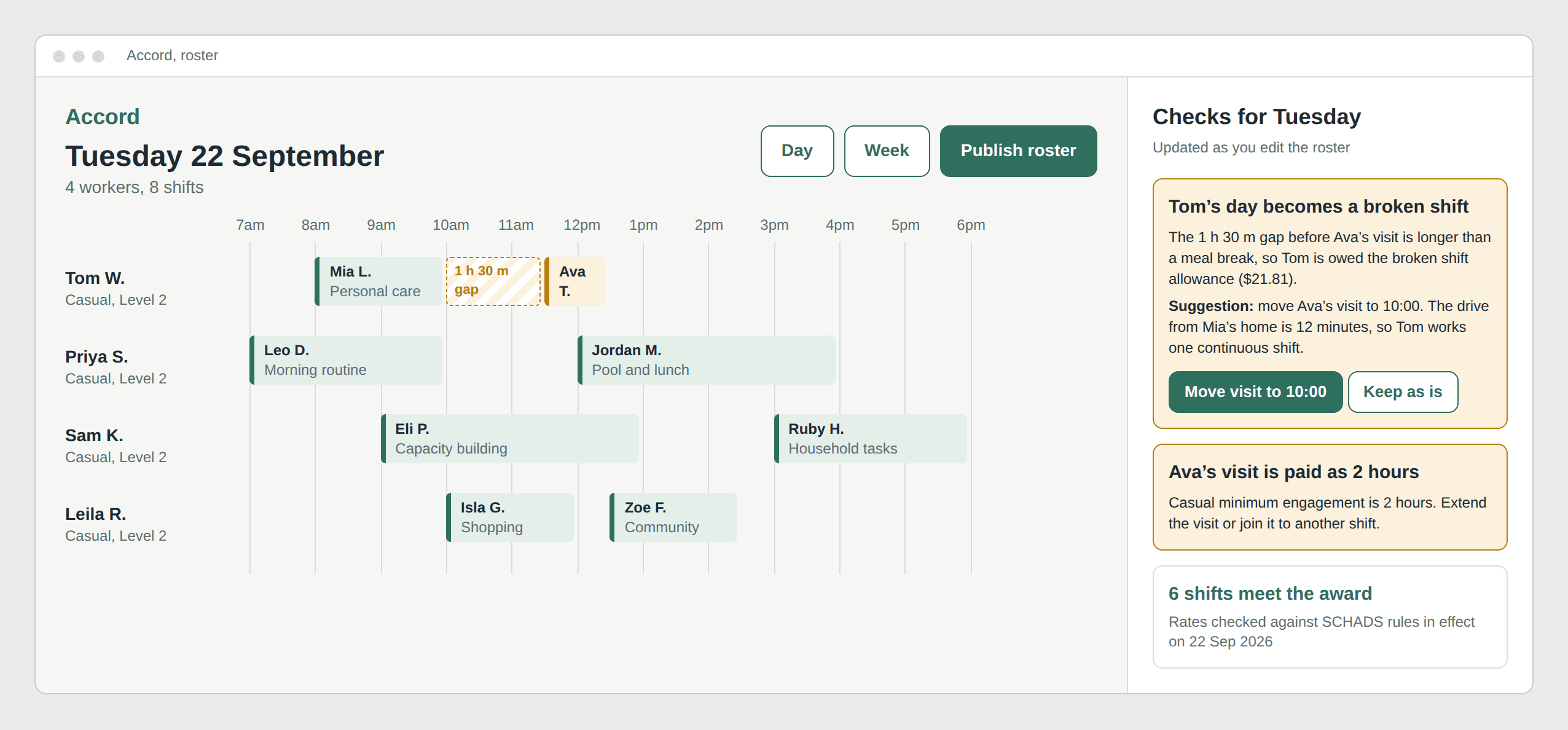
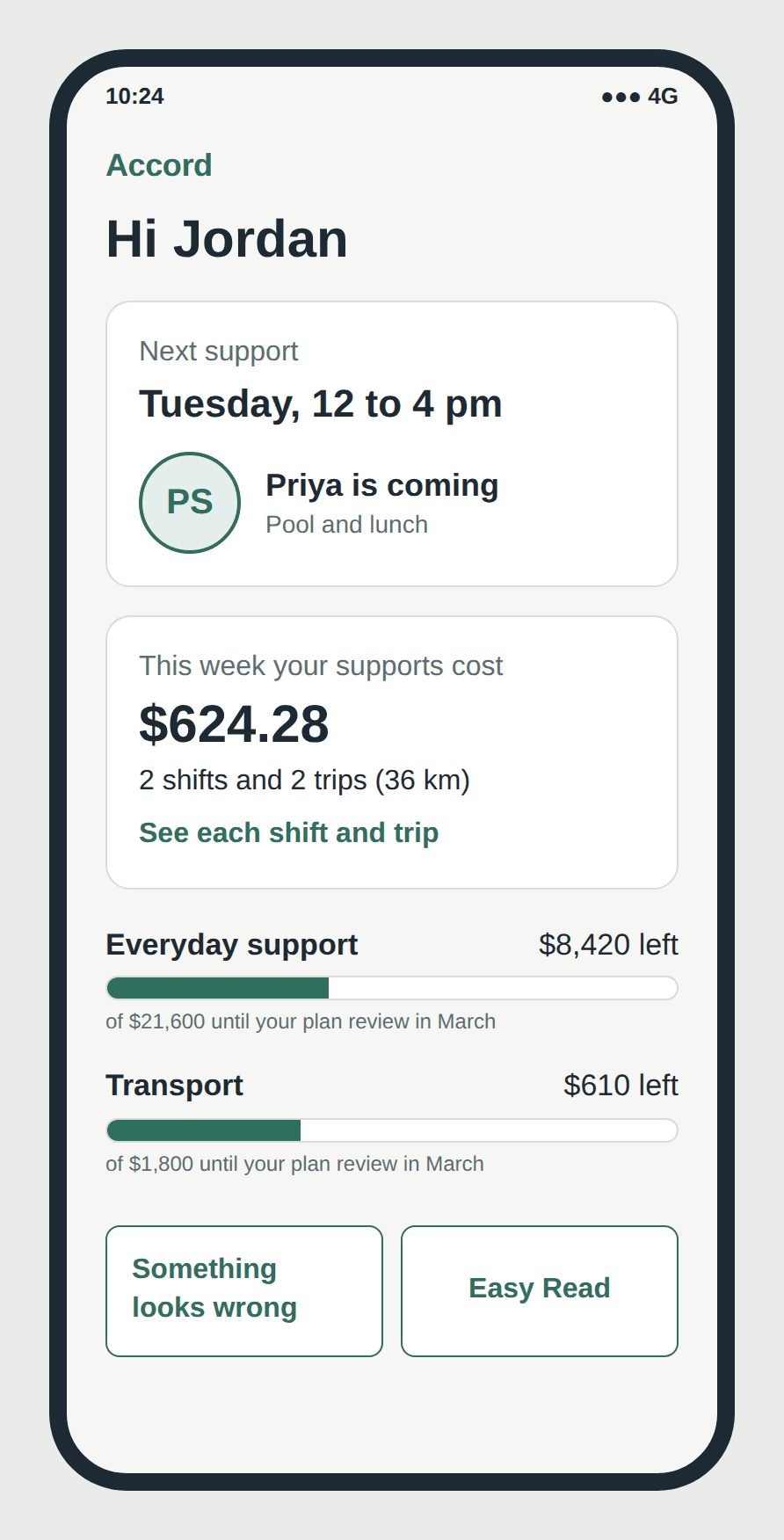
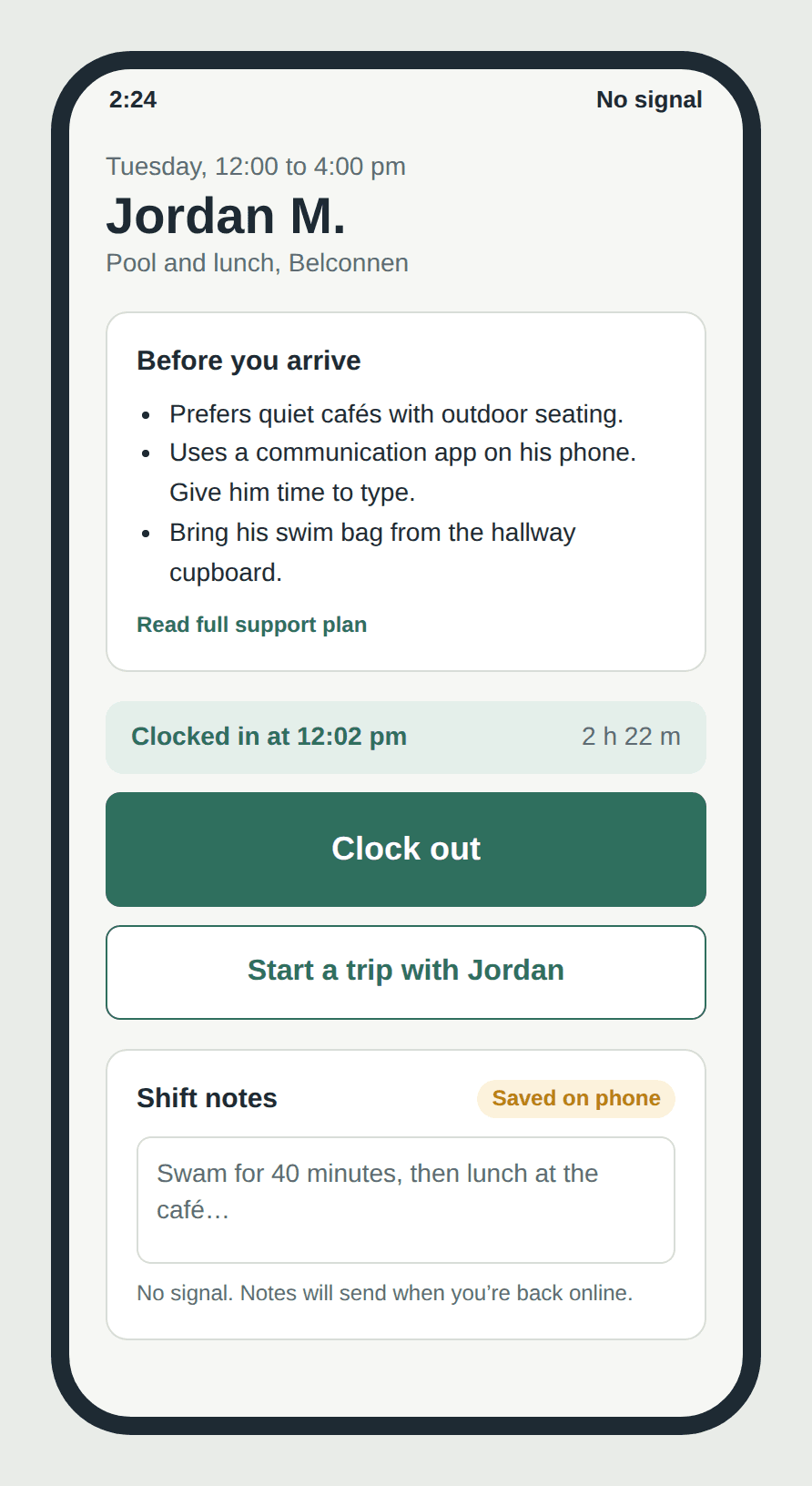
Based on these insights, I set the following design principles and created concept screens for a product I have given the working name Accord, because its job is to bring pay and billing into agreement. The screens follow one fictional provider through a single Tuesday, so the numbers carry across figures. All people in the mockups are fictional.
6.1 Design principles
- Warn at rostering time, not at payroll time.
- Show pay cost and billable amount side by side for every shift.
- Keep every rule dated, versioned and automatically updated.
- Make the accurate record the easiest one to submit.
- Give the participant a clear, accessible view of their own supports and spending.
6.2 Visual language
The screens use Atkinson Hyperlegible, a typeface designed by the Braille Institute to be easy to read for people with low vision, because the same design system has to work for participants as well as office staff. The colours are drawn from the Australian bush: eucalyptus green for actions and anything that is correct, and wattle yellow for things that need a person’s attention. Red is kept for money being lost, so it stands out when it appears. Warnings always say what happened and what to do next, in plain words.
6.3 Concept features
Roster builder with live compliance checks
As the coordinator drags shifts onto a worker’s day, the app flags issues immediately, e.g. “This 1‑hour visit will be paid as 2 hours (minimum engagement)” or “This 90‑minute gap will make a broken shift. Swap visit order to avoid it?”. Each flag links to the relevant award clause in plain English.
Shift margin view
Each shift shows three numbers: what the worker will be paid under the award, what can be billed to the participant’s plan, and the difference. Coordinators can see at a glance when a shift, or a travel arrangement, costs more than it recovers.
Rules engine with dated rates
Award and NDIS rates are stored with effective dates, so the $1.05/km temporary vehicle allowance applies from its start date and reverts automatically after 28 February 2027. Admins see a simple timeline of upcoming rule changes instead of a settings page.
Guided kilometre logging with smart verification
When a worker starts a trip with a participant, GPS tracking starts by default and the expected route distance is calculated automatically. Manual entry is still available for poor signal or GPS failure, but if the claimed distance is well above the expected route, the worker is asked for a short reason and the claim is flagged for a quick review. The participant (or their nominee) can see a summary of each trip.
Participant view
An accessible, simple view for participants and families: upcoming supports with the worker’s name and photo (initials in the mockup), a plain‑language summary of what each shift and trip cost their plan, and remaining budget by category. Designed with large touch targets, screen‑reader support and Easy Read wording.
Worker shift screen
One screen per shift with everything the worker needs: participant notes, clock in and out, trip logging and shift notes that can be saved offline and synced later.
7. Limitations and next steps
- My interviews covered a small number of managers and workers, mostly in one region, so the findings may not represent every provider type (e.g. SIL, allied health or large organisations).
- I only used Deputy hands‑on. Other platforms were assessed through documentation, reviews and interviews, and some comparison sources were written by competing vendors.
- Award and NDIS figures are accurate as at September 2026 and will change; the Schedule E increase was still subject to a final Fair Work Commission determination.
- The designs have not yet been tested with users. My next step is to run short usability tests of the prototype with support workers and coordinators, then build the rostering compliance check as a working prototype.
8. Conclusion
NDIS workforce apps are not failing because their developers don’t care. They are trying to automate two complex, constantly changing rulebooks that were never designed to work together. The result is software that records what happened but leaves people to work out whether it was right.
My research suggests the next generation of these tools should move compliance to the moment the roster is built, show the relationship between pay and billing on every shift, treat rules as dated data that update themselves, and finally give participants a clear view of the supports they pay for. As a support worker and a software engineer, this is the problem I want to keep working on.
References
- [1] Fair Work Ombudsman, Pay and allowances in the SCHADS Award. https://www.fairwork.gov.au/find-help-for/disability-support-and-aged-care-services/understanding-schads/pay-and-allowances-in-the-schads-award
- [2] Fair Work Ombudsman, Temporary increase to vehicle allowance for Aged Care Award and SCHADS Award (2026). https://www.fairwork.gov.au/newsroom/news/temporary-increase-to-vehicle-allowance-for-aged-care-award-and-schads-award
- [3] Fair Work Commission, Gender-based undervaluation – priority awards review. https://www.fwc.gov.au/hearings-decisions/major-cases/gender-based-undervaluation-priority-awards-review
- [4] McCullough Robertson, Fair Work Commission decision overhauls SCHADS Award framework and pay rates (June 2026). https://mccullough.com.au/2026/06/05/fair-work-commission-schads-award-decision-classifications-wages/
- [5] National Disability Services, What the SCHADS Schedule E pay increase means for providers (June 2026). https://nds.org.au/news/what-the-schads-schedule-e-pay-increase-means-for-providers
- [6] RosterElf, SCHADS Award pay rates 2026/27. https://www.rosterelf.com/guides/award-rates/schads
- [7] Teiro, Travel time between clients under the SCHADS Award. https://www.teiro.com.au/schads/travel-time/
- [8] VisiCase, SCHADS broken shift allowance: triggers, rules and rates. https://visicase.com/schads-broken-shift-allowance/
- [9] Carevo, NDIS provider travel charges explained (2026–27). https://carevo.com.au/blog/ndis-travel-charges-allowances-support-workers
- [10] NDIS, Travel claiming rules, gap fees and other costs. https://www.ndis.gov.au/news/10827-travel-claiming-rules-gap-fees-and-other-costs
- [11] NDIS Growth, ShiftCare vs Deputy for NDIS providers (2026). https://ndisgrowth.com.au/blog/shiftcare-vs-deputy/
- [12] CrossVault, ShiftCare vs Deputy: the SCHADS gap both share. https://crossvault.com.au/resources/shiftcare-vs-deputy
- [13] Teiro, Best NDIS apps for providers and support workers in 2026. https://www.teiro.com.au/resources/best-ndis-app-australia-2026/
- [14] Software Advice, ShiftCare reviews. https://www.softwareadvice.com/medical/shiftcare-profile/reviews/
- [15] ShiftCare, App Store listing. https://apps.apple.com/au/app/shiftcare/id1252971579
- [16] ShiftCare Help Center, GPS mileage tracking (see also Split mileage and shiftcare.com/pricing). https://help.shiftcare.com/en/articles/13482562-gps-mileage-tracking-in-shift-and-to-shift
- [17] NDIS Growth, Lumary alternatives (2026). https://ndisgrowth.com.au/blog/lumary-alternatives/
- [18] Fixable, ShiftCare vs SupportAbility vs Brevity vs Lumary: IT requirements compared (2026). https://fixable.au/ndis-fund-it-support/
- [19] Pay Cat, The Schedule E pay increase is coming (2026). https://www.paycat.com.au/blog/schedule-e-pay-increase
- [20] Xero App Store, ShiftCare listing. https://apps.xero.com/au/app/shiftcare